

Specification Parameters
Models & Access
- Supported models
- Doubao Seed 系列模型 · Ark platform, OpenAI-compatible interface, do not pass tools
- Reference benchmark endpoint
- doubao-seed-2.1-turbo(火山 Ark 推理接入点) · Scores will differ when using other models/versions
API & Actions
- GUI Agent action space
- click / drag / hotkey / left_double / right_single / scroll / type / wait · 8 discrete actions, defined in JSON format in the system prompt
- Grounding action space
- click · Single-step localization, outputs one coordinate at a time
- Coordinate system
- 0–1000 相对坐标 · Independent of screenshot resolution, mapping formula px = round(x / 1000 * width)
- Chain-of-thought field
- message.reasoning_content · No <think> wrapper in content
Usage Constraints
- First multimodal request latency
- 约 10~23s · Set timeout ≥ 120
- Batch evaluation concurrency recommendation
- 4–8 · --max-retries ≥ 3, --timeout defaults to 300s
Benchmark Reference
- sspro Accuracy
- ~54–56% · 3000×3000 resolution, temperature=0, integer coordinates, 27–28/50 hits
- osworld-g Accuracy
- ~84–86% · 3000×3000 resolution, temperature=0, integer coordinates, 42–43/50 hits
Evaluation Reference
- Overall Accuracy
- ~69–71% · Hit rate 69–71/100
Comparison with Similar Products
| Specifications | 本品 · doubao-seed-2.1-turbo | kimi-k3.1-pro | 火山方舟模型 API | qwen-audio-3.1-asr-flash | CreateArkOfficialResultQuery / GetArkOfficialResult |
|---|---|---|---|---|---|
| Main controller | — | — | — | — | — |
| NPU | — | — | — | — | — |
| Memory / VRAM | — | — | — | — | — |
| Reference unit price | Request a Quote | Request a Quote | Request a Quote | Request a Quote | ¥0.1 |
| Inventory | — | — | — | — | — |
Product introduction
This article describes how to call models via the Ark API to build GUI Agent applications that parse executable action intents from UI screenshots and prompts. Supported models are the Doubao Seed series.
I. Task flow: the model operates the GUI like a human — look at a screenshot → decide the next step → execute the action → look at the new screen, looping until the task is complete. Output in plain text without <seed:tool_call> is treated as task completion. Two usage modes: Mode 1, GUI Agent executes a multi-turn loop of observe → decide → act → observe again; Mode 2, pure Grounding performs only single-step localization and outputs a click coordinate.
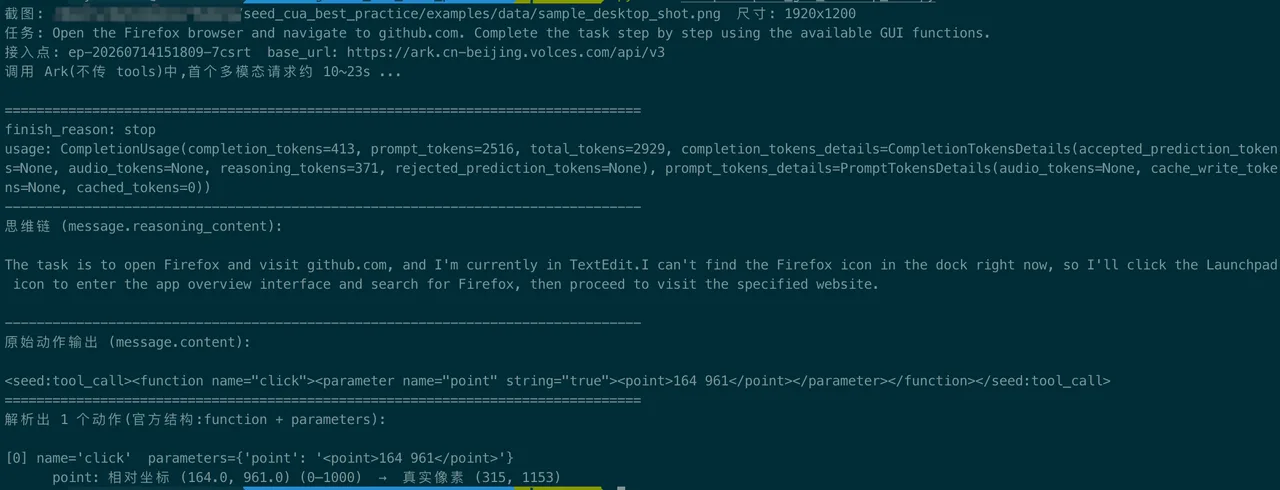
II. Key conventions: when calling chat.completions.create, do not pass the tools parameter; otherwise it goes through OpenAI function calling, and the output format will be incompatible with this guide. The model is trained to write action blocks directly into message.content, with the chain of thought in the separate field message.reasoning_content. All click/drag coordinates are relative coordinates in the 0–1000 range, independent of screenshot resolution; the mapping formula is px = round(x / 1000 * width).
III. Mode 1 implementation notes: the system prompt consists of two parts — TASK_SP (task framework) and FUNCTION_SP (action definitions), defining 8 discrete actions (click / drag / hotkey / left_double / right_single / scroll / type / wait); screenshots are converted to Base64 for transmission; action parsing calls the official parser parse_xml_action_65_with_validate_soft from the ui-tars package; an empty list returned means the model finished with plain text and the interaction has ended.
IV. Mode 2, pure Grounding: one instruction plus one screenshot outputs one click action coordinate, with no loop, no end-condition check, and no actual execution of actions; coordinates support integer or one-decimal precision, with the origin at the top-left corner of the screenshot.
V. Deployment and operations constraints: RGBA images should be converted to ("RGB") before encoding; the first multimodal request takes about 10~23s, with timeout set to ≥ 120; Ark has concurrency limits — for Grounding batch evaluation, a concurrency of 4–8 is recommended, --max-retries ≥ 3, and the batch evaluation script's --timeout defaults to 300s.