

CodeBuddy 插件
腾讯云A coding assistant plugin that provides AI-powered technical chat and code completion in mainstream IDEs such as VS Code and Visual Studio.
AI code review plugin for VS Code and JetBrains — enter /cr or select code to automatically review and generate commit messages.
CodeBuddy is an intelligent review assistant feature documented on Tencent Cloud Docs, offering developers on VS Code and JetBrains IDEs two core capabilities: AI-assisted self-review and AI commit message generation. In Chat mode, developers trigger local automated code review via the /cr command, and can choose to review files or folders, staged changes, or selected code in the editor. Review results include an overall assessment and a list of issues, supporting single or batch fixes displayed as Diff. When committing code, commit messages can be generated with one click, defaulting to the Conventional convention, with configurable language and style. The feature focuses on timely detection and fixing of local code changes, making it suitable for self-review during daily iterations; however, the page does not mention pricing or open-source status.
There are three review scopes: review files or folders (via the /cr command with @ references to specify single or multiple files/folders), review changes (current staged code changes), and review editor content (word-selection or entire project files). After selecting code in the editor, a floating panel appears where you can choose "Code Review" to trigger automatic CR review; you can also trigger method-level review via the code action lightbulb or the "Code Review" button above a method. After the review, the blue location areas in the issue list can be clicked to jump to the corresponding code snippets. Fix methods: for a single issue, choose "Apply Code" to automatically switch to Craft mode for fixing; for multiple issues, manually switch to Craft mode (button at the bottom left of the chat input box or shortcut Alt + I), enter "Start fixing issues" for batch fixes, view the process as a Diff, and confirm acceptance when complete. Commit message generation supports Chinese (default) and English, with three styles: change summary (default), Conventional Commits specification, and reference to recent commit history — all configurable in "Menu > Advanced Settings".
Developers working on projects in VS Code and JetBrains IDEs who need to self-review local code changes and generate standardized commit messages.
Install the CodeBuddy plugin in VS Code or JetBrains IDEs and enter Chat mode.
Enter /cr and use @ to reference the files or folders to review, or directly review staged changes.
Alternatively, select code in the editor and choose "Code Review" from the floating panel, or click the "Code Review" button above a method to trigger method-level review.
Press Enter to run the review, view the overall assessment and issue list in the chat panel, and click location areas to jump to corresponding code snippets.
For a single issue, choose "Apply Code" to automatically switch to Craft mode for fixing, or switch to Craft mode (shortcut Alt + I) and enter "Start fixing issues" for batch fixes.
After verifying the Diff results, choose "Accept" to complete the fix.
When committing code, invoke AI commit message generation with one click, and configure language and style in "Menu > Advanced Settings".
The feature is available to VS Code and JetBrains IDEs users, triggered via the /cr command in Chat mode; AI commit message language currently supports Chinese (default) and English. Pricing, account requirements, and regional restrictions are not stated on the page and need to be checked on the official website.
费用与套餐:以官网当前说明为准,本站不提供套餐价格保证。
A coding assistant plugin that provides AI-powered technical chat and code completion in mainstream IDEs such as VS Code and Visual Studio.
An agent plugin that infuses GitHub Copilot CLI and Claude Code with the latest WinUI 3 and Windows App SDK knowledge.
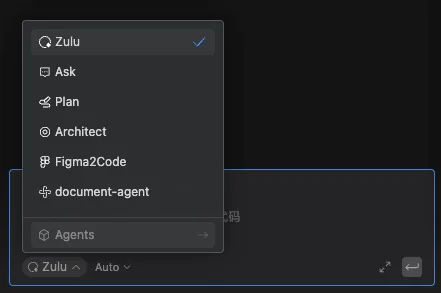
Build custom agents in the Comate coding assistant, enabling controllable, dedicated workflows through roles, skills, tools, and behavior rules.
A collection of Skills for AI Agents providing Ark document retrieval, model performance benchmarking, model migration analysis, and Seedance prompt optimization.