CodeBuddy
腾讯云AI code review plugin for VS Code and JetBrains — enter /cr or select code to automatically review and generate commit messages.
Build custom agents in the Comate coding assistant, enabling controllable, dedicated workflows through roles, skills, tools, and behavior rules.
Comate Custom Agents is an agent configuration feature of Baidu's Comate coding assistant: users define an agent's role, task instructions, skills, and tool scope via text commands, can check built-in tools (code editing, file reading, command execution, web preview) and MCP Servers, and control task handling through two execution strategies, Default or Todos. It targets dedicated workflows that Standard Mode struggles to cover, such as generating API documentation, writing and analyzing SQL, and serving enterprise domain knowledge. Agents can take effect at personal or project scope; once a project agent is committed to a version management platform, it can be shared with the team. Pricing and open-source status are not given on this page and need to be verified on the official pricing page.
Features fall into four categories: role definition (setting an identity such as code assistant, document reviewer, or data analyst), skill configuration (selecting or adding capabilities like search, rewriting, debugging, and code generation), behavior rules (constraining response style and task scope), and multi-agent collaboration (serving as a sub-agent of an official Agent through Subagent division of labor). Effectiveness scope has two levels: personal Agents take effect in all workspaces; project Agents take effect in the current workspace, and once committed to a version management platform, they can be shared by project owners. Execution strategies: Default automatically plans and generates code, while Todos generates a global Todo list and executes step by step. Tool configuration supports built-in tools and MCP Servers; MCP must be added via the MCP Marketplace and checked when creating the agent. The official site provides two reference examples: the API documentation generation Agent requires output of API overview, request methods and parameters, response fields, error codes, and sample requests/responses, prompting users for more information when insufficient rather than fabricating; the SQL processing Agent targets data analysis needs, emphasizing the use of appropriate aggregation and join statements, formatted results, documented assumptions, and data-driven recommendations. This page does not specify supported IDE types, account requirements, regional restrictions, or pricing models.
Suitable for developers and teams who need to solidify dedicated workflows in their coding IDE: technical writers who need fixed-format API documentation output, data analysts focused on SQL, and engineering teams that want to orchestrate complex tasks via Subagent division of labor and accumulate domain knowledge. Not suitable for newcomers unfamiliar with basic Comate coding assistant usage; reading its overview documentation first is recommended.
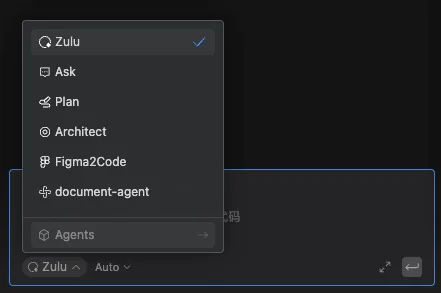
Click the Agent button in the conversation input area to expand the dropdown menu, then click Agents to enter the Agents page.
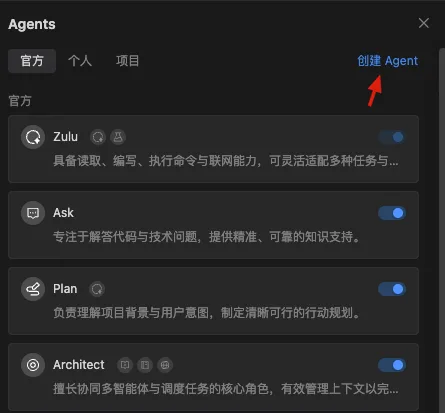
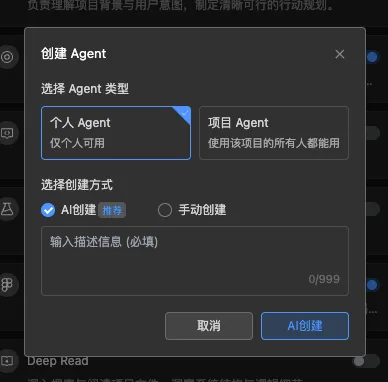
Click Create Agent; using AI creation is recommended: enter the intended purpose of the Agent, and the agent will automatically generate the role, task instructions, skills, and tool configuration.
Set the effectiveness scope: a personal Agent takes effect in all workspaces, or choose a project Agent that takes effect only in the current workspace and can be committed to a version management platform for sharing.
Configure the execution strategy: Default automatically plans and generates code, or Todos generates a global Todo list and executes step by step.
Fill in instructions: edit the agent's textual descriptions such as role, task instructions, skills, and input/output specifications.
Check tools: use Comate's built-in tools (code editing, file reading, command execution, web preview), or add MCP Servers from the MCP Marketplace and check the specific MCPs.
After completion, invoke the agent in a conversation and verify output quality following the official example approaches (e.g., API documentation or SQL processing), adjusting behavior rules as needed.
The source does not specify account registration, regional, or device restrictions; verify on the official Comate website. Effectiveness scope has clear constraints: personal Agents take effect in all workspaces; project Agents take effect only in the current workspace, and once committed to a version management platform, they can be shared and used by project owners. Pricing is not given on this page; check the official product pricing page.
费用与套餐:以官网当前说明为准,本站不提供套餐价格保证。